SQL Server 2016 Has Reached End of Support: What Are Your Options?


Hi all, Alex Durrant here again, Senior EUC Consultant at HybrIT. Databases aren't my usual patch, but this one has come up in a few customer conversations recently and thought it was worth a post.
On 14 July 2026, SQL Server 2016 reached end of extended support. That's the ten year mark under the Microsoft Lifecycle Policy. Standard security updates and Microsoft technical support have now ended, with Extended Security Updates available as a paid bridge for qualifying deployments.
If you've still got SQL Server 2016 running somewhere, nothing switches off and nothing stops working. But you're now carrying unpatched infrastructure that usually sits underneath something important, so it's worth getting a decision made rather than letting it drift.
What End of Support Means
Three things change on that date, unless you subscribe to Extended Security Updates:
Standard security updates stop
Microsoft technical support ends. You can't raise a support ticket for SQL Server 2016 any more, even if you hold an active support plan. With an ESU subscription you can, but only for issues relating to the updates themselves
Any newly discovered vulnerability stays unfixed. Even under ESU, only issues rated Critical by the Microsoft Security Response Center get patched
Everything else carries on exactly as it did the day before. The instance runs, the applications connect, the reports come out (for now!). That's what makes it easy to leave alone for another eighteen months.
The risk is cumulative rather than immediate. Every month that passes adds vulnerabilities that will never be patched on that instance. For anything regulated, or anything holding personal data, your auditors will usually get to it before an attacker does.

Extended Security Updates Are No Longer Free in Azure
This is the change most people miss.
With SQL Server 2014, migrating the workload onto an Azure VM as-is got you Extended Security Updates at no extra cost. That was a strong nudge towards Azure and plenty of organisations took it.
Microsoft has removed that for SQL Server 2016. Their documentation states it directly: migrating your workload to SQL Server on Azure VMs no longer provides free access to ESUs for SQL Server 2016 instances. You can still subscribe, but you pay either way. If anyone is building a business case on the assumption that a lift and shift into Azure solves the patching problem for free, that assumption needs revisiting.
The other details worth knowing before you cost it up:
Editions. Only Enterprise and Standard editions are eligible. You cannot subscribe to ESUs for Express, Web or Developer edition
Software Assurance. SA is a prerequisite for subscribing on premises under an EA, EAS, SCE or EES agreement. Without SA, the route is to migrate to Azure or connect to Azure Arc using a pay-as-you-go "License included" licence type
Core counts. Licensing is by virtual core, with a four core minimum per VM. If SQL Server is installed directly on the host without virtualisation, it's licensed by physical core
Patch level. You need to be on SQL Server 2016 Service Pack 3, the final service pack for the product, before ESUs will apply. SQL Server 2016 hasn't had cumulative updates since SP3, servicing has been security updates only, so get the latest of those installed and validated at the point you subscribe rather than waiting for the first ESU to land
Billing. Billing for SQL Server 2016 ESUs started at midnight UTC on 15 July 2026. Subscribe now and billing starts from the day you subscribe, plus a one-time bill-back charge to the first day of the ESU term
What you get. Security updates rated Critical by the Microsoft Security Response Center, and nothing else. No new features, no functional improvements, no customer-requested fixes. There's no regular release cadence either, updates come out only when a qualifying vulnerability is found
ESUs run for a maximum of three years, so for SQL Server 2016 that's availability until 17 July 2029.
None of this makes ESU a bad option. It just means it should be costed properly and treated as a bridge with an end date.
Your Three Options
Microsoft frames this as three paths, and in practice that's about right.
Option 1: Move to Azure SQL
The Azure route. Azure handles patching, backups, high availability and version updates, so the upgrade project stops recurring every few years.
Three shapes to choose from:
Azure SQL Database for applications that don't need instance level features. Hyperscale lets compute and storage scale independently as the data grows
Azure SQL Managed Instance for existing workloads that need to move with minimal application change. This is the closest PaaS equivalent to a SQL Server instance
SQL Server on Azure Virtual Machines where you need full control of the OS and the SQL configuration, or you've got third party components tied to a specific version
Worth being clear on the difference between those three, because "Azure SQL" is an umbrella term and they don't all solve the same problem. Azure SQL Database and Managed Instance are versionless platform services, so once you're there the end of support cycle stops applying entirely. SQL Server on Azure VMs is infrastructure. You're still running a versioned SQL Server that you patch yourself, so a 2016 instance moved across as-is is still a 2016 instance and still needs a paid ESU subscription. If you go the VM route, upgrade the SQL version as part of the migration rather than after it.
Backward compatibility is generally good, so a lot of applications move with fewer changes than expected. The bigger unknowns are usually SQL Agent jobs, linked servers, cross database queries and whatever integration nobody documented.
One useful detail: if you migrate an instance to Azure SQL Database or Managed Instance, or upgrade it to a supported SQL Server version, an existing ESU subscription cancels automatically. No manual step to remember.
Option 2: Upgrade to SQL Server 2025
Stay on your own infrastructure, move to a supported version. SQL Server 2025 brings engine and query processing improvements, continued investment in encryption and access control, native vector search for AI scenarios, and mirroring into Microsoft Fabric so operational data can feed analytics without hitting the transactional workload.
This is the right answer more often than the cloud-first narrative suggests. Data residency constraints, an existing hardware refresh cycle, latency sensitive on-premises applications, or a licensing position that already works are all perfectly good reasons to upgrade in place.
Best for: keeping databases on premises or hybrid, on a supported platform.
Option 3: Extended Security Updates
The bridge. Critical security updates only, available until July 2029.
Delivery depends on where the instance sits. On premises, other clouds and third party hosting go through SQL Server enabled by Azure Arc. SQL Server on Azure VMs subscribe by registering with the SQL IaaS Agent extension. If you genuinely can't connect an instance to Azure Arc, you may be able to purchase through volume licensing and register the disconnected instance manually, but that's a conversation with your Microsoft account team.
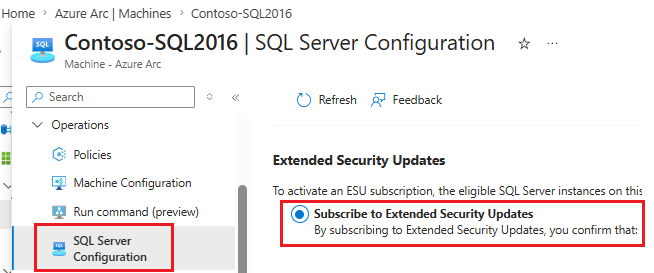
Worth flagging: connecting an instance to Azure Arc does not subscribe it to ESUs. That's a separate step in the SQL Server Configuration pane, and it has to be done explicitly per instance or applied at scale via Azure Policy.
Best for: buying time on a workload with real dependency or testing complexity.
At a Glance
Azure SQL (PaaS) | SQL Server 2025 | Extended Security Updates | |
What it is | Managed database service | Latest supported version | Paid security bridge |
Where it runs | Azure | On premises, hybrid or Azure | Wherever it runs today |
Patching and backups | Microsoft | You | You |
Future upgrade cycles | None | Every few years | Deferred, not removed |
Application change | Low to moderate | Low | None |
Cost shape | Consumption or reserved | Licence plus infrastructure | Per core subscription, billed hourly |
Time to deliver | Weeks to months | Weeks | Days |
Covers you until | Ongoing | Well into the 2030s | 17 July 2029 |
Choosing Between Them
Azure SQL fits when:
You want out of the upgrade cycle permanently
The application is reasonably modern and the dependencies are understood
You're already consolidating other workloads into Azure
There's an appetite to use operational data for analytics or AI later on
SQL Server 2025 fits when:
Data residency, latency or regulatory constraints keep the workload local
Third party software mandates a specific SQL Server version or instance level access
You've got hardware or a hosting contract with life left in it
The team is comfortable running SQL and you want to keep that control
ESUs fit when:
A vendor application isn't yet certified on a newer version
The migration is real but can't complete before the risk becomes unacceptable
You need budget approval in the next financial year rather than this one
The main thing to avoid is ESU becoming the decision by default. Three years goes quickly, and the same conversation comes back in 2029.
Windows Server 2016 Is Next
Worth checking at the same time. A lot of SQL Server 2016 instances are running on Windows Server 2016, which reaches end of extended support on 12 January 2027. If that applies to you, that's two end of support events on the same box within about six months of each other. Microsoft has confirmed ESUs will be available for Windows Server 2016 for up to three years, but that's a second subscription on top of the SQL one.
That's usually an argument for doing the work once. Rebuilding onto a supported OS and a supported SQL version together, or moving the workload to Azure SQL and retiring the server entirely, tends to be less disruptive than two separate change windows.
Where to Start
You can't plan this without knowing what you've actually got, and discovery almost always turns up more instances than the estate documentation shows. Usually SQL Express installed alongside a line of business application years ago, which is worth spotting early because Express isn't ESU eligible at all.
A sensible order of work:
Inventory. Every SQL instance, version, edition and patch level. Azure Migrate and the Data Migration Assistant will do most of the heavy lifting
Map dependencies. Which applications connect, which agent jobs matter, which integrations exist, and who owns each one
Classify. Business criticality, data sensitivity, and how much change the application can tolerate
Assess readiness. The Data Migration Assistant flags compatibility issues against a target version or Azure SQL before you commit
Decide per workload. This is rarely one answer for the whole estate. A typical outcome is some databases into Azure SQL, some upgraded in place, and a handful on ESU while a vendor catches up
Set the ESU spend against the migration cost while you're there. Three years of per core subscription across an estate of any size often funds a decent chunk of the modernisation work.
In Conclusion
SQL Server 2016 has done ten years of solid service and there's no shame in still running it. What's changed is that the clock is now visible, and the free-ESU-in-Azure route that worked for SQL Server 2014 isn't there this time.
All three options are legitimate. Azure SQL if you want the maintenance to stop being your problem. SQL Server 2025 if the workload belongs on your own infrastructure. ESUs if you need time, bought deliberately and with a date in the diary for when it ends. The organisations that handle these milestones well are the ones that did the discovery early and found out how much was actually in scope.
If you'd like help mapping out your SQL estate, working through the options, or building a migration plan that fits your budget cycle, get in touch with the HybrIT team.
For more on our Azure services, visit hybrit.co.uk/microsoft-azure