


MTR: Meeting Room Design and Deployment


Expectations for meeting room experiences have evolved. People now walk into a meeting room expecting it to just work, instantly, intuitively, and without friction. Whether they are in the room or joining remotely should no longer matter.
Yet many organisations are still designing meeting rooms around devices and layouts, rather than the experience they want to create.
That’s where Microsoft Teams Rooms steps in. It changes the focus from hardware to experience. With one touch join, integrated AV, and a consistent interface, MTR removes the complexity that traditionally slows meetings down and replaces it with something far more valuable, simplicity.
Start with how people will use the space
The most effective meeting rooms aren’t defined by their size. They’re defined by their purpose.
Before thinking about screens or cameras, it’s worth stepping back and asking a few simple questions. What kind of meetings will happen here? Are they formal client sessions, collaborative workshops, or quick internal catch ups? Will people spend most of their time presenting, or actively co creating?

Some spaces naturally lean towards structured meetings where the priority is presenting content clearly. Others are more fluid environments, where whiteboarding, content sharing, and interaction take centre stage.
Getting this right early allows you to design with intent, rather than retrofitting technology later.
One size does not fit all
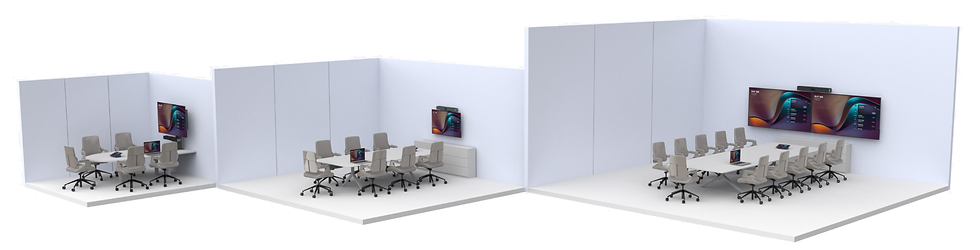
It’s tempting to standardise every room in the same way. In practice, that often leads to poor experiences. A small huddle space shouldn’t feel over engineered. A boardroom shouldn’t struggle with audio coverage or visibility. Each environment needs to be designed to match how people actually use it
Across most organisations, you’ll typically see a mix of spaces. Huddle and focus areas where speed matters most. Smaller rooms for structured team meetings. Medium spaces that balance collaboration and presentation. Larger rooms where audio quality, visibility, and inclusivity become critical
.
The fundamentals still matter
No matter how advanced the technology becomes, a successful meeting room still depends on getting the basics right.
Audio is often the first thing to fail, and the fastest way to disengage remote participants. If voices drop out, echo is present, or coverage is inconsistent, the entire experience suffers. That’s why microphone placement, speaker coverage, and acoustic treatment should never be an afterthought.

Video comes next. It’s not just about having a camera, but about what that camera actually sees. Field of view, lighting, and positioning all influence how connected remote participants feel. Modern intelligent cameras help by automatically framing participants and adjusting dynamically, but only when the room design supports them properly.
Then there’s control. Perhaps the most underrated part of the experience. When someone walks into a room and presses one button to start a meeting, everything changes. Friction disappears. Meetings start on time. IT support calls drop. That’s the real value of a well designed MTR space.
The room itself plays a bigger role than you think
Technology alone doesn’t create a great meeting experience.
Room layout affects sightlines and engagement. Furniture positioning changes how people interact with each other and the screen. Even the materials in the room can influence sound quality.
Lighting is another common challenge. Glare, shadows, or inconsistent natural light can make even the best cameras underperform These details are often overlooked, but they’re where good designs become great ones.
Scaling successfully requires standardisation
Designing a single meeting room is relatively straightforward. Designing a consistent experience across dozens of rooms is where it becomes complex.
The organisations that get this right tend to think in terms of standards rather than individual projects. They define room types, align on hardware, and create repeatable deployment models that ensure every space performs the same way.
This approach not only improves user experience, it also simplifies procurement, installation, and ongoing support. It turns meeting rooms into a scalable, manageable environment rather than a collection of one off solutions.
Whilst each room may have a different layout, you can still deliver a consistent user experience by standardising the technology. This allows users to walk into any space and join a meeting instantly, without needing to learn a new setup or adapt to different systems.
Meeting room control panels are a great example of this in practice. They allow each room to operate its own unique configuration, while maintaining a consistent interface and look and feel across the entire estate. From the user’s perspective, every room works the same way, even though what sits behind it may be completely different.

It’s a lifecycle, not a project
A common mistake is to treat meeting room deployment as a one time activity. In reality, it’s an ongoing journey.
It starts with understanding your spaces and requirements. From there, it moves into design, standardisation, and rollout. But that’s only part of the picture.
Adoption plays a huge role. Even the best room won’t deliver value if people don’t use it properly. Training, communication, and change management are essential.
Then comes the long term view. Monitoring usage, maintaining devices, and refining the environment over time ensures the investment continues to deliver value well beyond the initial deployment.
Flexibility is key in a hybrid world
Meeting spaces are no longer static. Rooms need to adapt to different meeting types, different users, and evolving ways of working. That means supporting both structured MTR experiences and more flexible setups where needed.
Modern solutions allow for both integrated and modular designs, giving organisations the ability to tailor each space without compromising the overall experience. The result is a meeting environment that feels consistent, but never rigid.
Bringing it together
Designing effective meeting spaces is about more than just the tech. It’s about how the room works, how people use it, and how consistently it performs. Here's a summary of everything you need to consider.
Consideration | What it means in practice |
Purpose of the room | Define how the space will be used, such as presenting, collaboration, or co‑creation |
Meeting types | Understand whether meetings are formal, informal, internal, or customer-facing |
Room size and capacity | Match the design and technology to the number of users and physical space |
User experience consistency | Ensure a seamless experience across all rooms, regardless of size |
Audio quality | Design for clear speech with proper microphone coverage and acoustics |
Video and camera setup | Position cameras for full visibility with the right field of view |
Lighting | Optimise natural and artificial light to support video quality |
Displays | Choose the right size, placement, and configuration for content visibility |
Ease of use | Enable simple meeting start with intuitive controls and one touch join |
Platform integration | Ensure seamless integration with Teams and collaboration tools |
Connectivity and cabling | Provide flexible, tidy, and reliable connectivity for users |
Standardisation | Create repeatable room designs to support scalability and consistency |
Network readiness | Ensure infrastructure can support high quality video and audio |
Future flexibility | Design spaces that can adapt to evolving hybrid working needs |
Support and lifecycle | Plan for ongoing management, monitoring, and optimisation of rooms |
How HybrIT can help
HybrIT help organisations transform traditional meeting spaces into modern, high performing collaboration environments built around Microsoft Teams Rooms.
From initial assessment through to design, deployment, and ongoing support, we deliver end to end meeting room solutions that are tailored to how your teams actually work.

Our partnership with MAXHUB enables us to provide a wide range of Microsoft Teams certified hardware, combining advanced audio visual technology with intuitive, easy to use interfaces. These solutions are designed to scale from small huddle spaces to large conference environments while maintaining a consistent, high quality experience.
Whether it’s display technology, camera solutions, bespoke audio design, or complete meeting room build and deployment, HybrIT bring everything together into a single, fully managed service.
Because ultimately, it’s not about deploying meeting rooms, it’s about designing spaces where collaboration works better.
Read more information about our MTR services here or reach out via hello@hybrit.co.uk
Download our PDF to learn more about our Meeting Room services.


